PRD v1.3 · INTERACTION SPEC
New-user activation & first-run experience
Brew · Product Requirements Document Interaction Instructions. The problem is not the value of the product, a few minutes before the new user finishes opening it.
117TestFlight Cumulative Tester
13External users form stable habits (22%)
3 → 6Polaris: median first week session (minimum 4.5)
5 + 1Five functional modules + full module event tracking
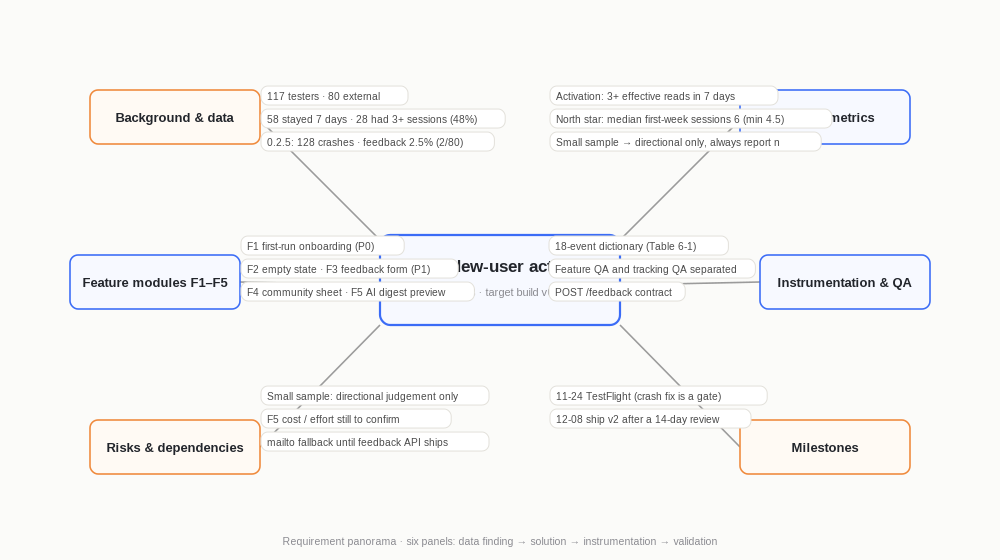
Why activation first: 94 of 117 testers installed the build; among 80 external anonymous users, 58 kept it for 7 days — 48% had 3+ sessions and 22% (13 people) formed a stable habit. Product value holds; the drop-off happens after install.
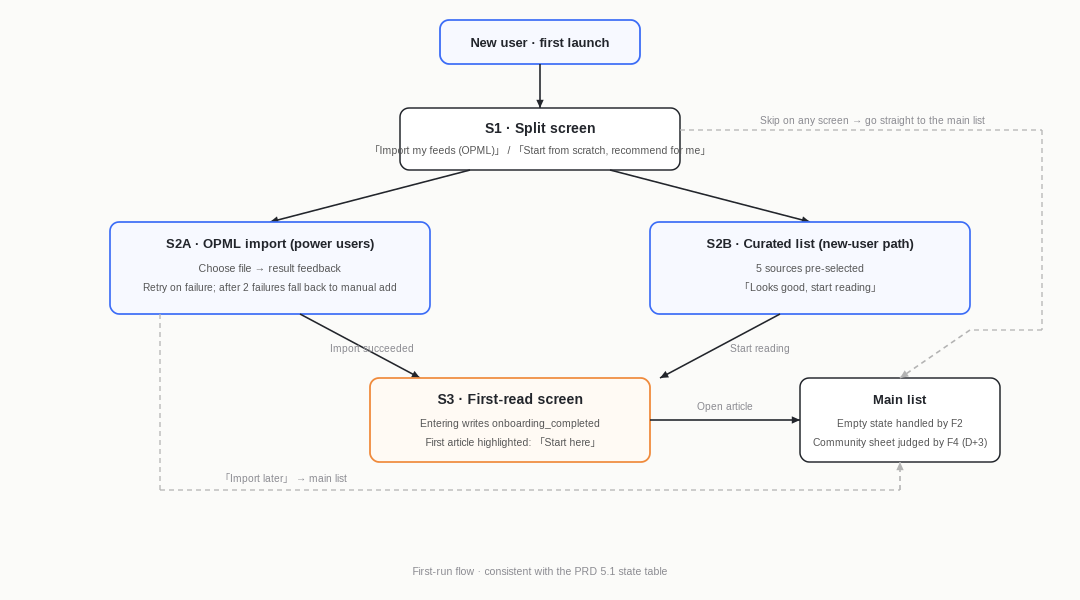
Three-screen flow: ① The “What kind of reader are you?” screen only splits the paths — no RSS / OPML jargon on the new-user button; ② power users import OPML in one tap (on parse failure they can fall back to the curated list); new users pick a few sources and continue. Both paths can be skipped and neither dead-ends.
Pre-dependency: The 0.2.5 crash issue (128 crashes across 7 internal accounts) must be fixed first — optimising activation on a crashing build is pointless.
Pre-dependency: The 0.2.5 crash issue (128 crashes across 7 internal accounts) must be fixed first — optimising activation on a crashing build is pointless.
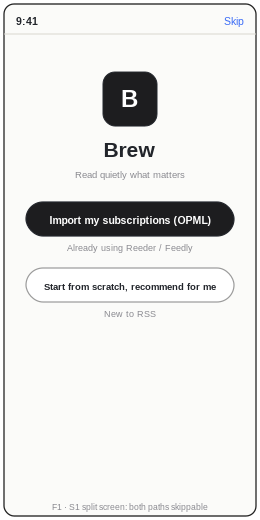
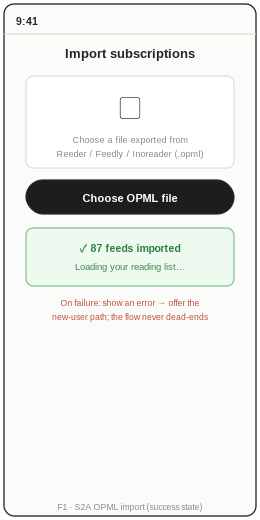
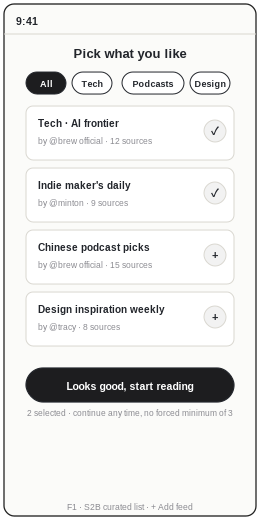
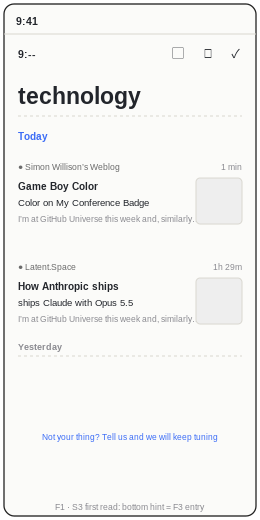
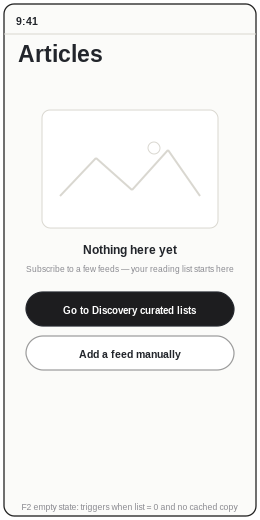
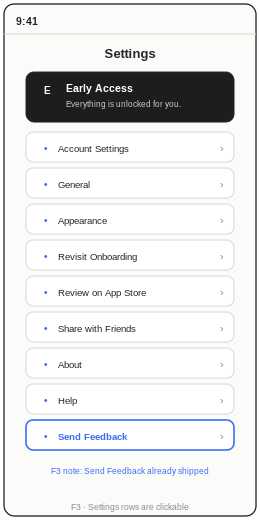
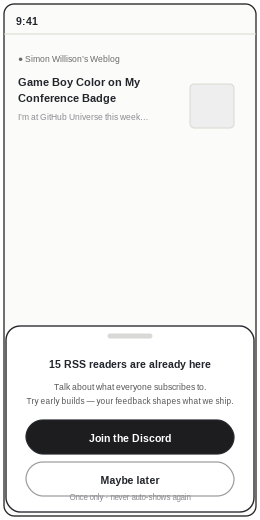
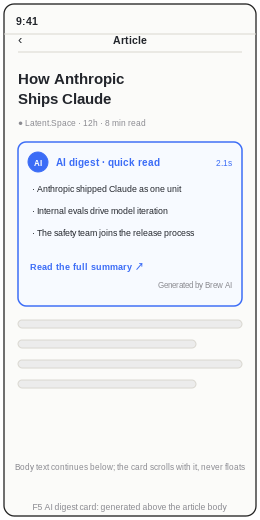
All of the aboveLow Fidelity Wireframe Schematic(PRD Figure 5-1 ~ 5-8), only the information hierarchy and interaction logic are expressed, and the visual details are subject to the design draft; the official text for users is in English, and the Chinese text in the wireframe is not directly used. Click on the image to zoom in.
P0F1First bootstrap refactoringClient 1.5 man-days
- Only the first cold launch and
onboarding_completed=falseEnter; the “skip guide” at the bottom of both roads can directly reach the main list, and the empty state is pocketed by F2, and dead-end alleys are not allowed. - It is not provided in the bootstrap to return to the previous screen, and the system gesture returns to disabled; the two main buttons can be clicked at any time, and the press feedback is given within 300ms after clicking, without loading and waiting.
- Shunt Result Write
onboarding_path(new user/expert); from the settings page “Revisit Onboarding” re-enter the no-repeat shunt. - OPML supports .opml/.xml, single file 2MB, and parsing for more than 30 seconds. Press Failure to process; Successfully display the actual number of imported sources, and 0 are processed as Failure; Failure gives two exits to the “Retry/Take Away Recommended List”.
- Status store:
onboarding_started/onboarding_path/onboarding_step; The next cold launch after the half-kill process continues from the exit screen. - Events reported: onboarding_start, onboarding_step, onboarding_skip, onboarding_completed, opml_import, feed_add/feed_remove, article_open (src: first_read).
P0F2 Empty state transformation0.5 person-days
- Principle: Each empty state must be given a clickable next step, only one sentence is not allowed.
- Articles empty: “Your reading list is empty. Pick a collection to fill it up.” plus two buttons (go to Discovery curated lists / add a feed manually); Search no-results and Collection empty get the same actionable treatment.
- Real-time determination when the main list is 0 and there is no local cache, do not mark the cache - the empty state must reappear after the user deletes the feed.
- Illustration provides two sets of light and dark switching with the theme, and copywriting switching with the system language; report empty_state_show/empty_state_click.
P1F3 Feedback EntryClient 0.5 + Server 0.5 man-days
- Upgrade “Pull up the mail” to the in-app feedback form: free text input, automatically attach the model, system version, and app version, and submit the same HTTPS channel (post/feedback) as the event tracking.
- Two entries: Setup page “Send Feedback” resident item + line at the bottom of the first reading screen, distinguished by src (settings/onboarding); keep the original scrolling position after returning.
- API fields: submit_id, src, content, device, os, app_version, has_log, log_tail (≤ 8 KB), ts; HTTP 200 counts as success.
- This version clearly does not do: screenshot attachment, ticket system, third-party feedback SDK; email is only used as a back pocket after submission failure.
P1F4 Community Guided Popup0.5 person-days
- Display judgment (once per cold launch): ≥ 3 natural days from the first start, at least one positive action has been completed, not shown, not rejected - one of the four conditions is indispensable.
- The half-screen bottom sheet slides in from the bottom and does not obscure the body; the point mask does not close (prevents accidental touch); and it is automatically displayed up to 1 time for life.
- “Later”, that is, write
popup_dismissed=true, will never pop up automatically afterwards; the settings page keeps the permanent “Join the Community” entrance out of control. - If the device is offline, the sheet is not marked as shown and can be retried on the next launch; an offline tap shows a short connectivity message and does not consume the once-only quota. popup_show / popup_click share the same source as the decision flags.
| State Variables | Type | When to change |
|---|---|---|
| first_launch_date | Date | First cold launch write, do not change after |
| has_positive_action | Bool | Set to true when reading a full article or successfully adding a feed |
| popup_shown | Bool | Built-in true for the same transaction displayed in the pop-up window (display failure is not set) |
| popup_dismissed | Bool | Click “Later” to set true, the highest priority |
P2F5 AI Summary Initial ExposureClient 1 + Server 0.5 man-days
- No new features are added, only an AI summary guide card is automatically generated at the top of the first body of the first reading, so that the core selling points are seen in the first reading.
- Design principles: AI only helps users focus, not read for users; by default, only three key points are displayed, click “View full text summary” to expand in place, and the card scrolls with the body and does not hover.
- In the generation, three rows of skeletons are displayed; more than 8 seconds or a failed card is collapsed to “summary generation failed, click here to retry”, which does not block reading; the body is less than 300 words and is not generated.
- Server-side constraints: P95 ≤ 6 seconds, timeout 8 seconds, failure rate ≤ 5%, single input truncated 6000 words, results cached for 7 days according to article_id; over-limit downgraded to non-display.
- Report ai_summary_use, ai_summary_feedback; the first week penetration rate is an observation indicator, not included in the definition of activation.
P0event tracking (Full Module Dependency)Client 0.5 + Server 0.5 man-days
All modules share one escalation channel (HTTPS post/JSON):
event, did (Keychain random UUID, no personal information collected), ver, ts, sid, propsThe event dictionary covers app_open, onboarding_*, opml_import, feed_add/remove, article_open/article_read, empty_state_*, popup_*, ai_summary_*, feedback_submit. Acceptance criterion 1: feature QA and tracking QA are signed off separately.Out of scope for this release
Push RecallThe TestFlight push channel is unstable. It is a negative experience for users who have only been here 1–2 times. The official version will be discussed again.
AI Newbie Teaching and Selling AdvocacyThis version only exposes the first summary of F5, does not claim AI functions, and does not use AI utilization as an evaluation item.
Intent to infer popupThere are about 28 external users who meet the conditions, and there is no statistical significance in segmenting the population in the sample; the development cost is 2–3 days, the revenue is close to zero, and it has been recorded to avoid repetition.
Multi-Screen Carousel Beginner TutorialThe feature description is not activated, the user wants to “see something immediately”.
Risks & dependencies (excerpt)
If the crash fix slips, every milestone moves with it and no public link may be shared; if the curated list is low quality, manually review each source for content quality and update cadence before launch; if tracking is missing, enforce a merge gate plus a smoke test.
Source: Brew New User Activation and Initial Experience Optimization PRD v1.3 (internal, chart supplement). This page is a summary of the interactive description for the portfolio display, without changing the caliber of the PRD body. · ← Back to personal site · Companion Data Analysis Report PDF ↗